QuickSupply
Apparatus & equipment · Available now

The physical asset keeps the history.

BayFloor separates the apparatus from its changing unit designation, then connects checks, equipment, testing, work orders, maintenance, cost, and downtime to the right physical record.

Inside BayFloor

Fleet, equipment, checks, and supply readiness meet in one view.

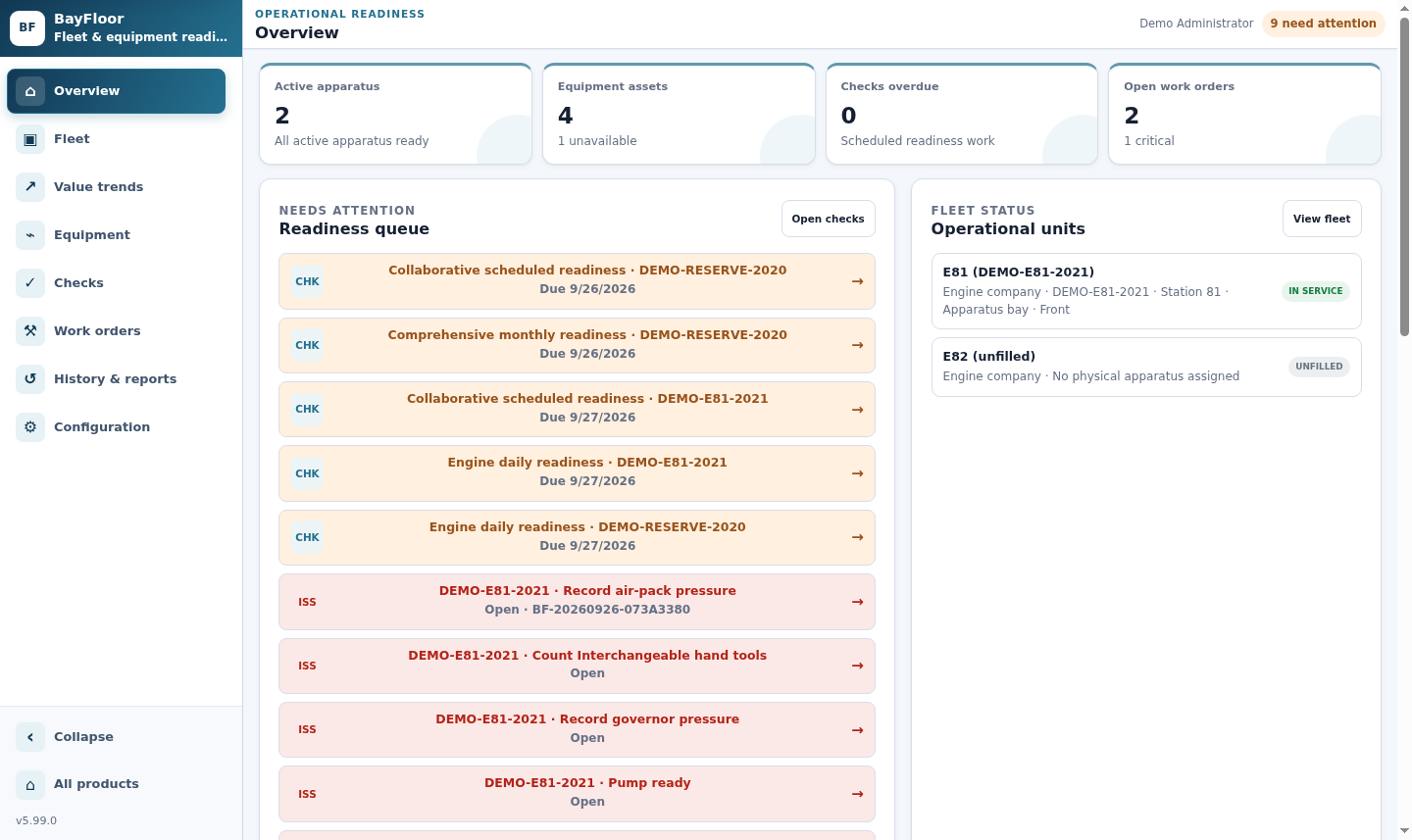
BayFloor overview showing apparatus, equipment, work orders, and a populated readiness queue
Operational overview. Apparatus status, equipment availability, open work orders, scheduled checks, and active issues share one synthetic demo view.Open full-size view ↗
The operating loop

Readiness follows the apparatus through every change.

Rig swaps, equipment movement, checks, failures, and maintenance all update the current state without rewriting the past.

01 / ASSIGN

Place the apparatus

Match a compatible physical apparatus to an operational unit, station, and approved crew seats.

02 / CHECK

Verify the full complement

Run apparatus and dynamically generated assigned-equipment checks in one shared session.

03 / RESPOND

Turn failure into action

Require evidence, create corrective work, restrict use, or mark the right asset out of service.

04 / MAINTAIN

Track the service cycle

Follow work, cost, parts, vendors, downtime, tests, and the explicit return-to-service decision.

Feature depth

Fleet readiness without losing asset identity.

BayFloor keeps operational labels flexible while the physical vehicle and every equipment item retain durable records.

01 / APPARATUS

Permanent identity, current designation

Keep VIN, plate, manufacturer, model, year, fuel, warranty, service dates, replacement targets, and custom fields on the physical apparatus.

  • Compatible-type rules for unit positions
  • Reasoned, timestamped rig swaps
  • Complete assignment timeline
02 / EQUIPMENT

Agency-defined assets and movement history

Manage ladders, saws, generators, pumps, thermal imagers, radios, rescue tools, meters, and any agency-defined equipment type.

  • Apparatus, station, storage, or loan assignment
  • Serialized equipment records
  • Every move and OOS event retained
03 / CHECKS

Templates that follow the actual complement

Schedule checks by date or meter, add currently assigned equipment at run time, and let multiple users work separate lines together.

  • Mileage, engine, pump, and generator hours
  • Tracked values with limits and outcomes
  • Autosave and same-line conflict protection
04 / FAILURES

Configured consequences, not vague notes

Each check line can require notes or photos, open corrective work, request supervisor review, restrict use, or mark the target out of service.

  • Immutable evidence with file digest
  • Append-only status changes
  • Readiness queue until superseded by a pass
05 / MAINTENANCE

Preventive work triggered by time or use

Create recurring maintenance from calendar dates, mileage, engine hours, pump hours, generator hours, or inspection results.

  • Priority, assignee, vendor, parts, and cost
  • Expected and actual downtime
  • Controlled return to service
06 / TESTING

Evidence behind every certification

Record functional tests, annual inspections, ladder and hose tests, pump service, tool tests, certifications, and calibrations.

  • Performed, expiration, and next-due dates
  • Provider and certificate references
  • Failed tests can open work and set OOS
Operational depth

Current readiness with the history to explain it.

Dashboards lead to the underlying event, document, reading, test, assignment, or work order instead of stopping at a status color.

01
Meter trend analysisChart authoritative mileage, engine, pump, generator, or agency-defined readings over standard or custom periods.
02
Cost and downtime reportingCombine work-order costs and service cycles with downtime intervals derived from immutable status events.
03
Document centerAttach registrations, warranties, manuals, reports, invoices, certificates, and photos to the correct apparatus, asset, or work order.
04
Cross-module readinessSee permitted SCBA and supply signals in context, then open the authoritative PackRat or QuickSupply workflow.
Built for the team

One fleet, working views for every role.

Crews

Complete guided checks, see current apparatus and equipment, and surface failures with the evidence required.

Fleet & maintenance

Manage service, parts, vendors, tests, meter schedules, downtime, and return-to-service decisions.

Administration

Review fleet readiness, lifecycle, cost, certification status, assignments, and printable reports.

See BayFloor in context

Bring us a rig swap, failed check, or maintenance cycle.

We will walk through how BayFloor keeps the operational picture and the permanent record aligned.

Call 833-511-5002