QuickSupply
Stations & facilities · Available now

Give building-side work a real home.

Quarters connects station inspections, recurring duties, rooms, facility assets, issues, work orders, vendors, documents, and capital projects into one operational record.

Inside Quarters

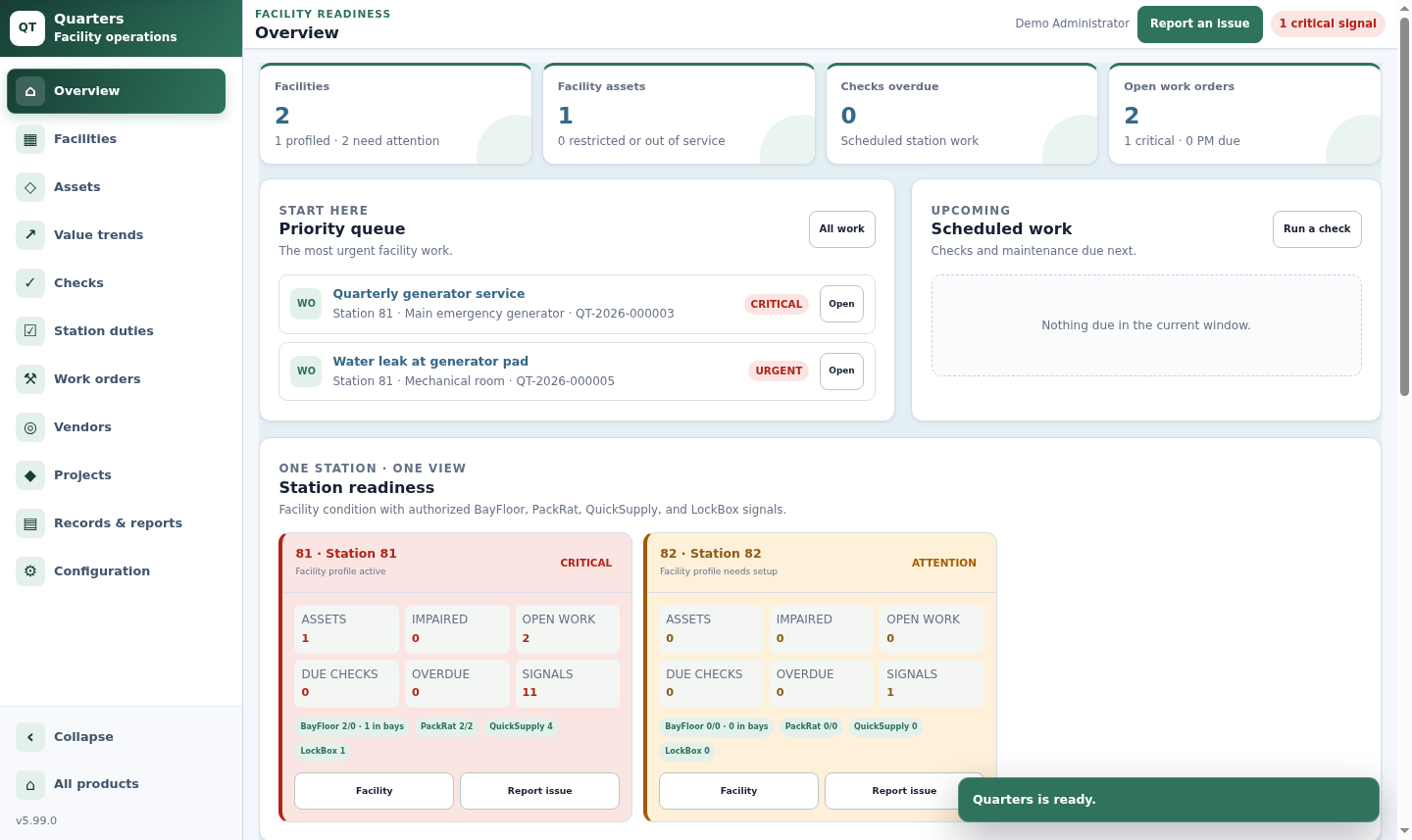
Station readiness combines facility work with permitted suite signals.

Quarters overview showing facility assets, priority work orders, and station readiness signals
Facility overview. Generator service, an urgent facility issue, asset totals, open work, and suite readiness signals appear together in the synthetic demo.Open full-size view ↗
The operating loop

See the place, the problem, and the work together.

Every issue belongs to a known facility, room, or asset and can move into assigned, documented corrective work.

01 / MAP

Structure the facility

Represent the station, building, floor, area, room, and the assets installed inside it.

02 / INSPECT

Run checks and duties

Use full inspections for technical work and recurring check-offs for daily station responsibilities.

03 / REPORT

Capture the issue

Record the room or asset, priority, description, photo, reporter, and server-assigned time.

04 / RESOLVE

Complete the work

Assign the vendor or technician, track labor, parts, cost, documents, completion, and verification.

Feature depth

A facilities system built around the station.

From a bay door to a renovation, Quarters keeps the asset, work, vendor, cost, and supporting history together.

01 / HIERARCHY

Find the exact place

Model facilities through buildings, floors, areas, and rooms so issues and assets do not collapse into one station-wide list.

  • Apparatus bays, dorms, shops, and supply rooms
  • Facility and room-level history
  • Apparatus placement by bay
02 / ASSETS

Track the systems that keep the station working

Manage HVAC, generators, bay doors, exhaust capture, compressors, alarms, security, fuel systems, lifts, and agency-defined assets.

  • Manufacturer, model, serial, and installation
  • Warranty and service-life dates
  • Vendor, manuals, and service documentation
03 / CHECKS

Collaborative inspections with tracked readings

Build sectioned templates for facilities, rooms, or assets and let multiple users autosave separate lines and photos in one session.

  • Pass, issue, N/A, text, choice, and numeric lines
  • Good, bad, and OOS thresholds
  • Failure evidence and corrective consequences
04 / DUTIES

Lighter-weight recurring station work

Schedule daily, weekday, monthly, or custom-day responsibilities without forcing a simple chore into a full inspection.

  • Facility and optional room scope
  • Named or qualified-user assignment
  • Immutable completion identity and time
05 / MAINTENANCE

Issue intake through preventive service

Turn failures or user reports into work orders and generate recurring maintenance for the equipment and systems that need it.

  • Assignment, status, cost, labor, and parts
  • Attachments, completion, and verification
  • HVAC, generator, door, alarm, and vendor schedules
06 / PROJECTS

Keep larger work connected to the facility

Track renovations, replacements, additions, and major improvements with budgets, actual cost, owners, vendors, dates, and milestones.

  • Related assets and work orders
  • Contracts, permits, drawings, and certificates
  • Hashed document records
Operational depth

Every station gets an accountable history.

The current work queue stays practical while the underlying checks, values, documents, costs, and completion events remain reviewable.

01
Tracked-value trendsChart agency-defined readings for a facility, room, or asset over standard or custom periods with thresholds and immutable detail.
02
Vendor contextKeep contacts, service type, contracts, expiration, rates, documents, work orders, and facility assignments together.
03
Failure-to-work continuityA failed check can require evidence, create corrective work, affect status, and enter a supervisor review queue in one completion.
04
Station-wide readinessAuthorized views bring in apparatus, SCBA, inventory, and limited controlled-storage signals without copying their source records.
Built for the team

The station is shared. The work stays accountable.

Crews

Complete station duties, continue shared inspections, and report a problem from the room or asset where it happened.

Facilities teams

Manage preventive maintenance, work orders, vendors, documents, costs, and the asset history behind each call.

Administration

Review open issues, overdue checks, facility costs, vendor activity, projects, lifecycle exposure, and printable reports.

See Quarters in context

Bring us a station issue or maintenance program.

We will walk through how the facility, asset, vendor, work, and history stay connected.

Call 833-511-5002