QuickSupply
EMS inventory · Available now

Know what is on the unit before you need it.

QuickSupply turns receiving, using, moving, counting, and restocking medical supplies into fast, scan-driven workflows while retaining the lot, expiration, location, and transaction detail logistics needs.

Inside QuickSupply

Field workflows lead. Inventory detail stays close.

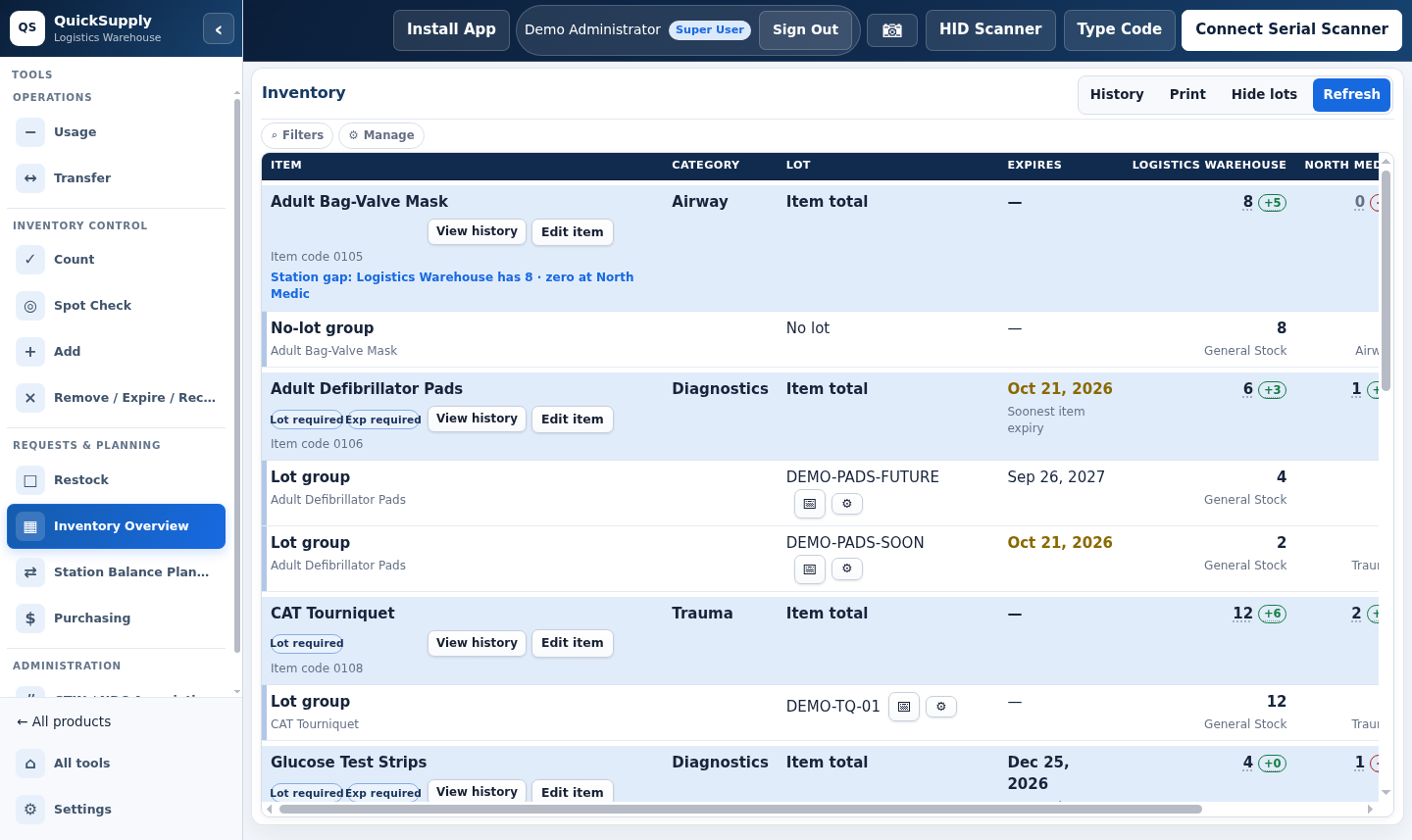
QuickSupply inventory overview showing medical supply lots, expirations, quantities, and station balances
Live inventory overview. Medical supplies, lots, expirations, quantities, and station-balance gaps are visible in the synthetic demo.Open full-size view ↗
The operating loop

Inventory stays useful because every movement has a place.

Work starts in the correct station, apparatus, compartment, or container, then leaves a reviewable record without slowing the crew down.

01 / RECEIVE

Identify the supply

Capture the item, quantity, package size, lot, expiration, supplier, and destination.

02 / LOCATE

Put it where it belongs

Keep inventory tied to its station, apparatus, compartment, kit, or storage location.

03 / MOVE & USE

Scan the change

Record usage or transfer multiple items, review the batch, then commit once.

04 / VERIFY

Count and restock

Compare expected to actual, preserve discrepancies, and move shortages into restock work.

Feature depth

Built around real inventory movement.

QuickSupply handles the field interaction and the logistics record as two sides of the same transaction.

01 / BARCODES

Resolve the item from the label already in hand

Scan GS1 DataMatrix, GS1-128, UPC, Code 128, QR, or an internal barcode, with manual entry as a fallback.

  • Parse GTIN, lot, and expiration
  • Associate unknown barcodes with authorization
  • Map multiple barcodes to one catalog item
02 / CATALOG

A catalog that understands EMS supplies

Keep agency item numbers, manufacturers, NDCs, GTINs, units of measure, vendors, substitutions, and par levels together.

  • Lot and expiration requirements by item
  • Default, minimum, and maximum quantities
  • Active and replacement-item controls
03 / LOCATIONS

Inventory in operational context

Select the working location first so unrelated stations never blend together and field users see only what is relevant.

  • Station and apparatus inventory
  • Compartment and container hierarchy
  • Preassigned kiosk locations
04 / COUNTS

Count what should be there

Load expected inventory by compartment, scan to confirm, enter manual quantities when needed, and review every difference before submission.

  • Expected, counted, and difference
  • Clear counted and uncounted state
  • Permanent count history
05 / RESTOCK

Turn a shortage into assigned work

Create restock needs without requiring a scan, identify source and destination, assign an owner, and follow the request through completion.

  • Draft, in-progress, completed, and cancelled states
  • Order creation from restock needs
  • Confirmed completion workflow
06 / TRACEABILITY

Follow the lot and the action

Usage, transfers, receiving, and counts retain the person, place, quantity, time, lot, and notes needed to reconstruct change.

  • Lot-location and recall search
  • Expiration and expired-item visibility
  • Duplicate-safe integration retries
Operational depth

Fast in the bay. Defensible in logistics.

The crew gets a short path through the task. Logistics keeps the structured history behind it.

01
Batch before commitScan multiple items, correct mistakes, and review the complete action before inventory changes.
02
Package-to-unit confirmationReceive bulk packaging without silently guessing how many usable units it contains.
03
External writes without duplicate submissionsPreserve required IDs, log failures, permit retries, and keep local state until remote confirmation.
04
No mandatory third-party inventory systemQuickSupply remains usable as the agency's operational inventory record on its own.
Built for the team

One inventory picture, different working views.

Crews

Scan, count, use, move, and get back to service without digging through inventory administration.

Logistics

See lot placement, expiration exposure, restock needs, count differences, and receiving history.

Administration

Review who changed what, where it happened, and how field activity affects readiness.

See QuickSupply in context

Bring us your current inventory workflow.

We will talk through how receiving, counts, usage, and restocking work in your department today.

Call 833-511-5002